Saved Views Feature Overview

Executive Summary
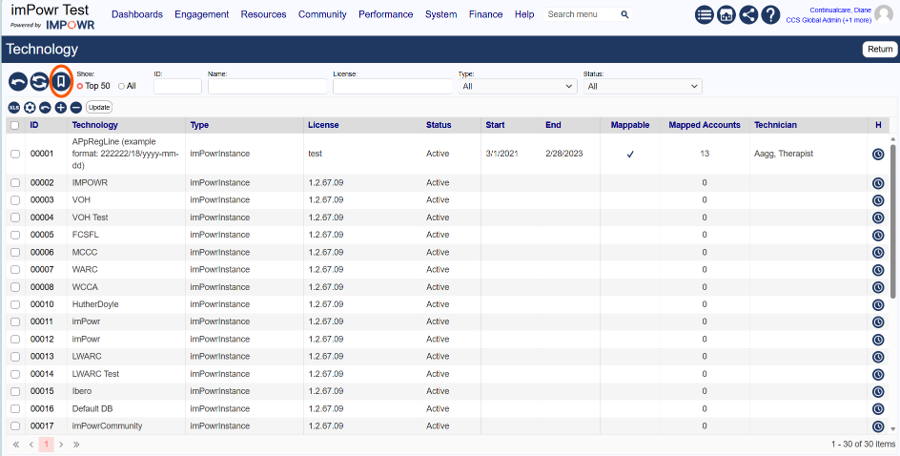
The new Saved Views capability transforms IMPOWR List pages into flexible self-service display and reporting tools. Users can save filters, column configurations, and sorting preferences as reusable views; share them across teams, roles, or the organization; mark favorites for quick access; and export results to Excel or Datasets.
You will see a new 'bookmark' icon on the pages that have this feature.
Business Goals
Saved Views support the following key objectives:
- Build reports without IT support
- Filter data dynamically and save population definitions
- Save column layouts and output definitions
- Save complete report configurations as reusable views and ‘favorites’
- Export report results to multiple formats
- Support role-specific access and reporting experiences
What Is a Saved View?
A Saved View is a reusable configuration that combines a defined Population and Output.
Population Definition
Defines which records are included through saved filters.
Examples:
- Active members in a specific county
- Open referrals assigned to a care team
- Providers with contracts expiring in the next 90 days
Output Definition
Defines what information is displayed about those records.
Examples:
- Selected columns of specific data
- Column order
- Column widths
- Sort order
Saved View
Users save both the population definition and output definition together as a named ‘Saved View.’
Example: High-Risk Members - Care Management
- Filters: High Risk Score > 80
- Columns: Member Name, Risk Score, PCP, Last Contact Date
- Sort: Risk Score Descending
Foundational Features
The following capabilities are included in the current release:
| Feature | Status | Comments |
|---|---|---|
| Visible columns | ✅Available | |
| Column order | ✅Available | |
| Column widths | ✅Available | |
| Sort order | ✅Available | |
| Filters | ✅Available | |
| Favorite views (Star) | ✅Available | Users can designate frequently used views as Favorites using a star icon. Benefits: Quick access to important reports, Reduces time spent searching for views, Personalized reporting experience |
| Personal views | ✅Available | Accessible only to the creator |
| Shared/team views | ✅Available | Shared with designated teams or workgroups |
| Organization-wide views | ✅Available | Available across the entire organization |
| Role-based views | ✅Available | Available automatically to users based on security roles. Examples: Care Manager Dashboard View, Provider Network View, Compliance Team View |
| View ownership & permissions | ✅Available | |
| Excel export | ✅Available | Used for ad hoc analysis and data manipulation |
| Dataset export | ✅Available | Creates a dataset that can be utilized elsewhere in IMPOWR reporting and dashboarding |
| PDF export | ✅Available | Creates a printable and shareable report output |
Save a View
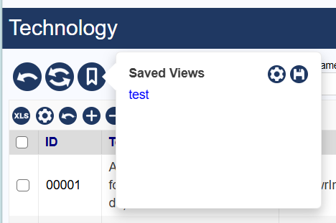
Click on the 'floppy disk' icon to specify a name for your View and Save it.
Manage Saved Views
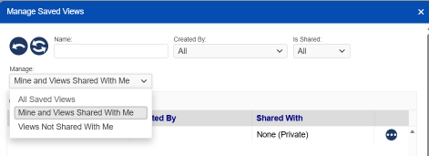
You can filter by 'All', 'Mine and Views Shared With Me', and 'Views Not Shared With Me' when managing your Saved Views.
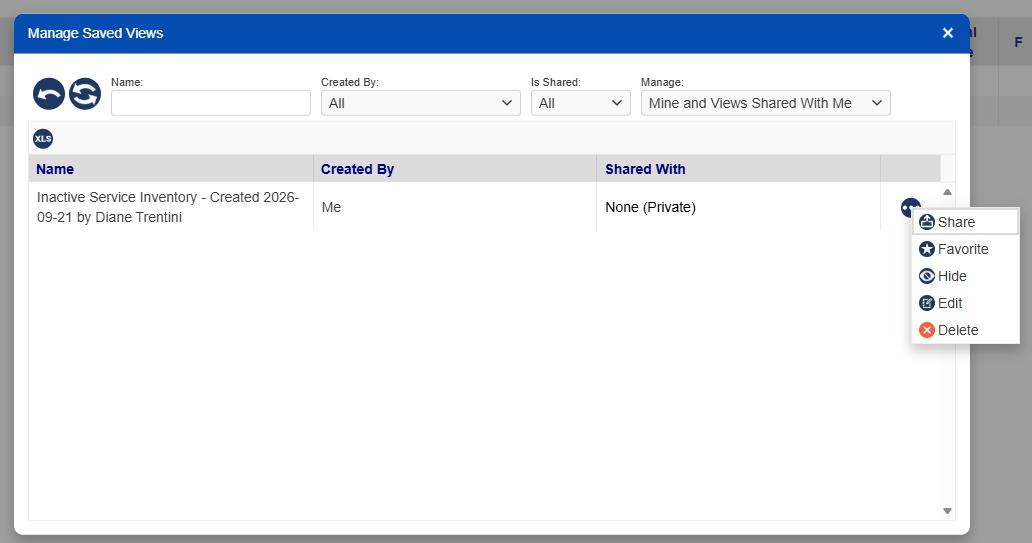
The following are features you can use to manage your Saved Views:
- Share,
- Set as 'Favorite',
- Hide,
- Edit, and
- Delete your Saved Views.
A Foundation for Future Features
Saved Views capabilities set the foundation in place for future improvements in page usability and user-driven reporting. Future features being considered include grouping, calculated fields, and dynamic aggregations.
List of Pages with Saved Views capabilities
- AccountList - NEW Client, Staff and Users list pages.
- TaskList
- AccountProgramActivity (Program Engagements)
- Programs
- AccountBanking
- AccountContacts
- AccountDiagnosis
- AccountGoals
- AccountInterventions
- AccountMapping
- AccountPossessions
- AssetExpenseSummary
- BarrierList
- BehaviorList
- CallScripts
- Campaigns
- CAPALibrary
- Channels
- ClientFunds
- ClientGroups
- ClientLetterQueue
- Complaints
- Concerns
- ConfigureIntStatuses
- CredentialLibrary
- Credentials
- DSRequests
- EditQuickLinks
- EpisodeList
- Equipment
- EthnicityGroups
- FacilityInventory
- FileUploadSizes
- GoalLibrary
- HealthIssues
- ImportFreezeList
- InboundGrantApplications
- InfractionGroups
- InspectionTypes
- InventoryTransactions
- JobOrders
- MedicationErrors
- MetricList
- MyTraining
- OrganizationDonations
- OrganizationGroups
- OutboundGrantApplications
- PayPointCodes
- POMSFactors
- ProgramExpenseSummary
- ProgramGroups
- ProviderAssignedGoals
- Providers
- Quarantines
- StaffTeams
- Technology
- TransportQueue
- TransportRoutes
- UDFList