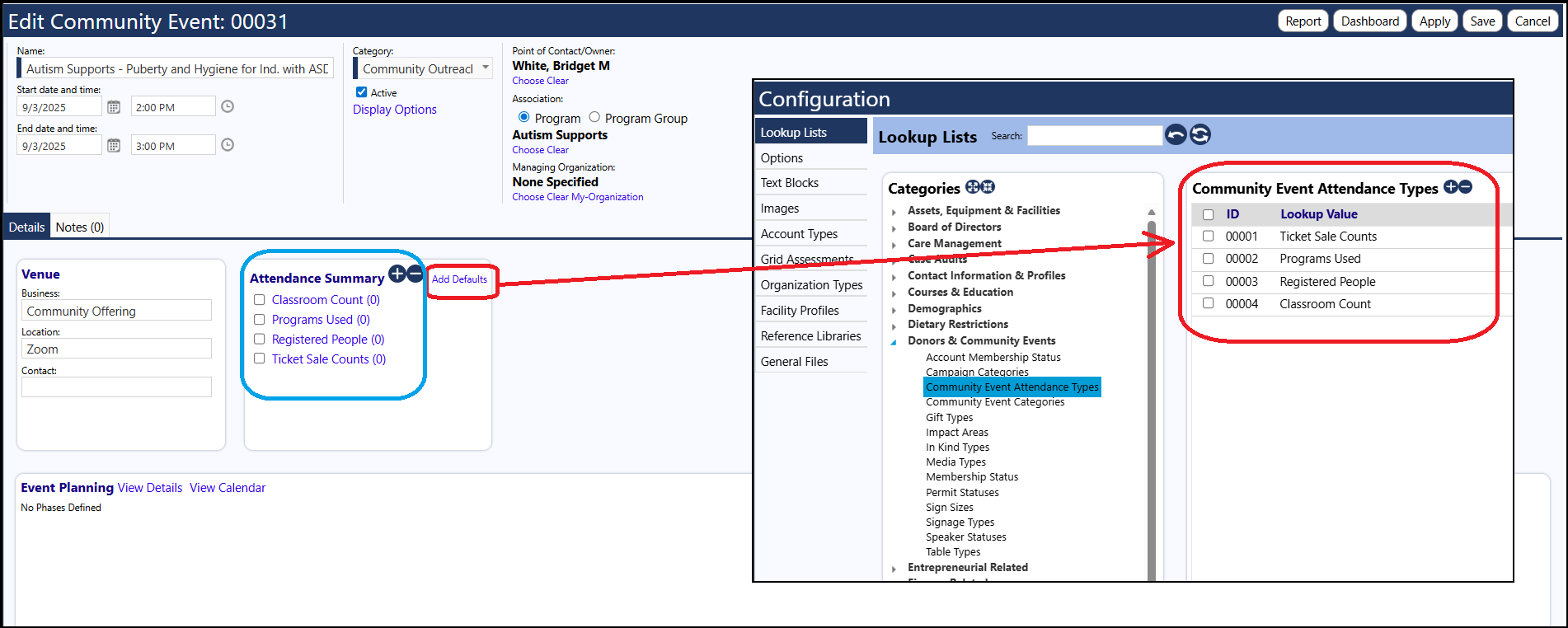
You can setup the Attendance types in one of 2 ways:
1.) Set them up directly in the Community Event
a.) Access the Community Event
b.) Go into Edit Mode
c.) Select the Attendance Summary Panel (on the Details tab)
d.) Click the '+' to add a new Attendance Type
2.) Set them up as a Default Attendance Type and then Add the Defaults in the Community Event
a.) Access the Configuration Lookup Lists
b.) Navigate to the Community Event Attendance Types (in the Donors & Community Events Category)
c.) Add the Attendance Types
d.) Access the Community Event
e.) Go into Edit Mode
f.) Select the Attendance Summary Panel (on the Details tab)
g.) Click the 'Add Defaults' to add the Attendance Types that were set up in Configuration