Release Note Summary
Release Note Summary 1.3.55. This release note update covers key features and changes released as of January 14, 2026.
What's New?
Population Analysis
Population analysis member count is increased to 2000; a print option and a tabular view are added.
System
Privileges around Roster and Client scoping are consolidated and configured in new category "Client Access Control"
My Account
- Users will consistently be directed to MyAccount when clicking in the avatar.
- "My Account" has additional attributes controlled with granular privileges. Privileges have been migrated for backwards compatibility based on previous access of roles.
Forms
- “Fill From Previous” button is added on AccountForm, SurveyHome, and TreatmentPlanDoc when Auto Save Submission and Temporary Save/Retrieve are enabled on form settings.
- Assessment forms now have the 'form view'/'print view' radio behavior.
- The 'fill from previous' on forms is now added to EmploymentPlanDoc page.
Community Events
- Added Report Option for Community Events.
- Community Event plan editor shows Tasks with a colored background.
- Community Event plan's Tasks can have a form attached.
Tasks
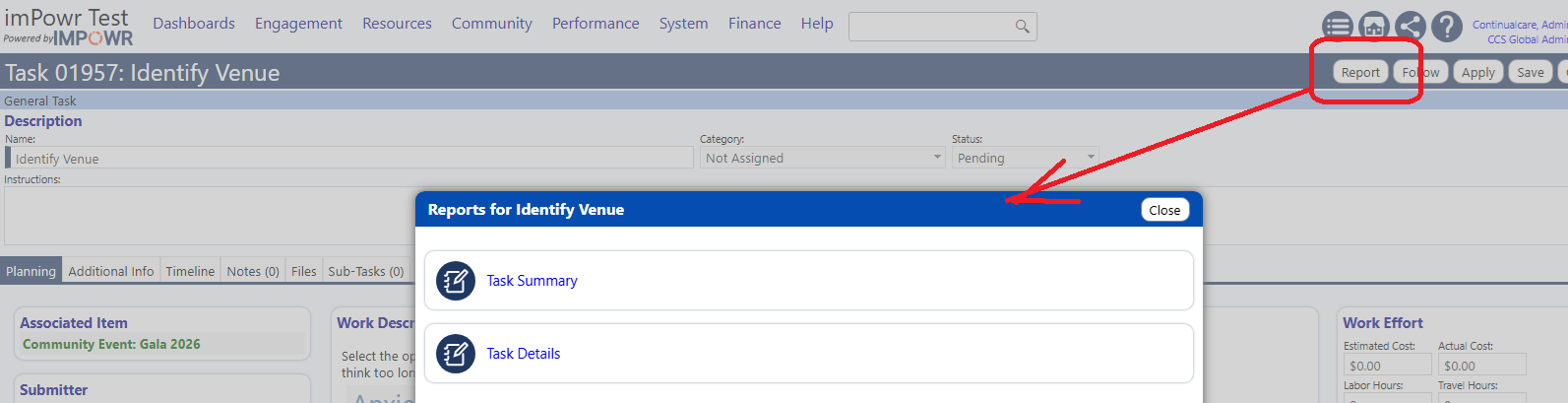
Added Report option for Task Details.
Appointments
- Appointment creation shows reference tags when in use.
- Privileges for various screens showing appointments are now more granular. Privileges have been migrated in a backwards compatible way so users will maintain access.
Consent
Consents are now included on the account level note & file summary, and the label on consents now reflect that "Special Requests" are in fact Notes.
Account Reviews
- Other Race, Other Ethnicity, and DOB show more information on account review.
- Multiple account reviews are supported. Grant access to additional reviews on the Account Role editor.
- New Account Review editor is available as a reference library.
Account-Program Engagements
- Creating enrollments via the Quick dialog checks for potential overlap and prompts the user.
- Creating enrollments via the Quick dialog includes an option to set Role 1. The query driving this can be configured as a custom SQL object.
- The "Details" tab can be hidden from a workflow.
- Creating enrollments via the Quick dialog includes an option to limit the list of programs to a Program Group, and conditionally links authorized users to the configuration of the selected Program Group.
- The Dynamic Summary has more granular configuration around including content for complete/not complete steps.
- The automatic step completion and calculation is now added to some program workflows.
Tags
Standard entity tags privileges are split out to be more granular, and can be modified from the Account Roles setup. Upon release, these new privileges are automatically granted to roles that already have the permission.
Intake
- Account status now shows on the duplicate name check during intake.
- Associated Program enrollment can be forced for Applicants and Form-based intake
- The default primary language on Client intake and applicant portal is made configurable.
Accounts
- On the "Clients" list, Managing Staff can now show as an optional column with filter.
- On the View/Edit Account page, orange Overview and Summary buttons automatically toggle with their associated privileges. Pages that didn't previously have a dedicated privilege now do, and those are granted to roles who previously had access via a backwards compatibility migration.
- A new Chooser mode is added for Managing Staff on EditAccount page.
- Edit privileges for fields Status, Type, Intake Date, Login, Portal on Account page can be now configured in settings.
- New reserved words are added for account managing staff on with account ID and without account ID.
[MyAcctManagingStaff]
[AcctManagingStaff]
[MyAcctManagingStaffWithID]
[AcctManagingStaffWithID] - Modified the reserved word AcctHasConsentOptions to only show options for Active Consents.
Demographics
- The Race dropdown can be optionally configured as a multi-select.
- A new option is added to exclude some Races from race list.
- Required race on intake supports either singular or multi-picker.
Tasks
- Sub-task pop-up now pre-fills the edit information.
- Sub-task details are now added on Task details report.
Community Events
- A new panel is added for tracking Community Event Attendances.
- A default list of Community Event Attendance Types can be now configured. When a new Community Event is created, the list of attendance types is initialized to the default list.
- Event attendance is now added to the event details report on community events page.
- Staff availability is now added to daily, monthly details and summary reports.
- Dashboards are added to Community Event page.
- The Community Event phases view/edit privileges are now independent from Community Events.
- A new event report is added to the Event Phases Page.
Dynamic Summary
- When Workflow Dynamic Summary is clicked, if a client has multiple enrollments, a warning is displayed. It will redirect to Dynamic Summary when 'Proceed' is clicked.
- Workflow step options for Dynamic Summary are now reverted and configured using the summary options to hide/show.
- Added option to hide empty questions from Dynamic Summary Form display.
Account Review Groups
The account review groups page is refined with a new UI.
Pay Points
- A new Pay Point Schedule page is added to configure Pay Points in an Organization.
- The Pay Point Schedule page now has a new filter displaying the rate on certain dates.
- Most Recent Reconciliation dropdown filter is now added to Account Pay Points page.
- Payer Billing Code and Ledger Code are added to Pay Point Schedule.
- The date range on Account Pay Points is made optional; when checked the start and end dates are displayed.
- A new column Acct Prog ID is added to Account Pay Points page linked to the Workflow page.
- Reimbursement amount can be now added to Pay Points on Pay Point Schedule page.
- Invoice management and Pay Points are enhanced with improved naming, PO number handling, submission restrictions, and updated invoice list features.
- New export options are added for Account Pay Points.
- Pay Points details related to a Program are now displayed on the Program Workflow page, Pay Point tab.
- Bulk update option is added for "Intended Payor Organization" on Account Pay Point page.
- Optional date range column is now added to View/Edit Invoice page.
- The direct billing configuration is updated for pay point grid, invoice flows, validation rules, multi-invoice display, price calculation using new schedule, conditional UI elements, tooltips, and sorting enhancements.
- Invoicing is enhanced with voided invoice handling, reinvoicing rules, new billing filters, improved invoice chooser search, updated payer filters, and submission restrictions.
- Invoice status names can be now modified.
- Bulk operation is added for "Intended Payer Selection" on Account Pay Point page.
- Reconciliation Status and Reconciliation Comment columns are added on Pay Points page. Added UI enhancements, as well as Bulk update enhancements. A new Reconciliation popup is added, linked to invoices; Updates are audited.
Healthcare Events
New episode types 'Hospital Acquired Infection' and 'Community Acquired Infection' are now added to the Healthcare Events.
Grant Applications
'Category' and 'Owner' are added as optional columns to External Grant Applications, and the filters and column names are refined.
Staff Availability
Assignment reports are added to the Staff Availability page.
Assessments
A Print View button is now available on the Perform Assessment page.
What's Improved?
System
- A SendGrid email issue is now resolved.
- Custom Fields no longer show repeated categories.
- Display issue on session print page is now resolved.
Custom fields
Comma delimiter issue with UDF values is now fixed.
Forms
- Mapped fields on multi-page forms are operating correctly now.
- Unfilled required fields highlight in more scenarios.
Accounts
- The export option for the account reports is removed.
- The Account reports on profile wizard page usability bug for comprehensive report is now fixed.